
Uninstall via the app
- Please see this article re Soundflower & El Capitan. It has uninstall instructions from within the app.
Uninstall Soundflower via Package
- The first step is to Download version Soundflower 1.6.6b.
- Find the installer DMG. It's probably in your Downloads folder.
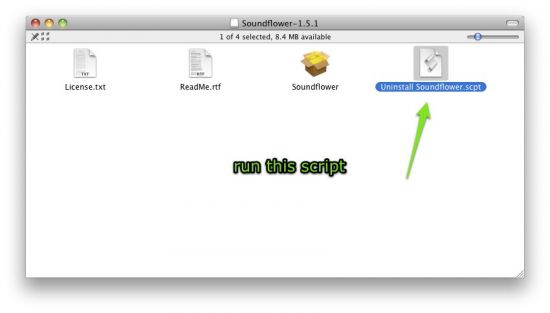
- Open up the downloaded DMG file, and run the script highlighted below.
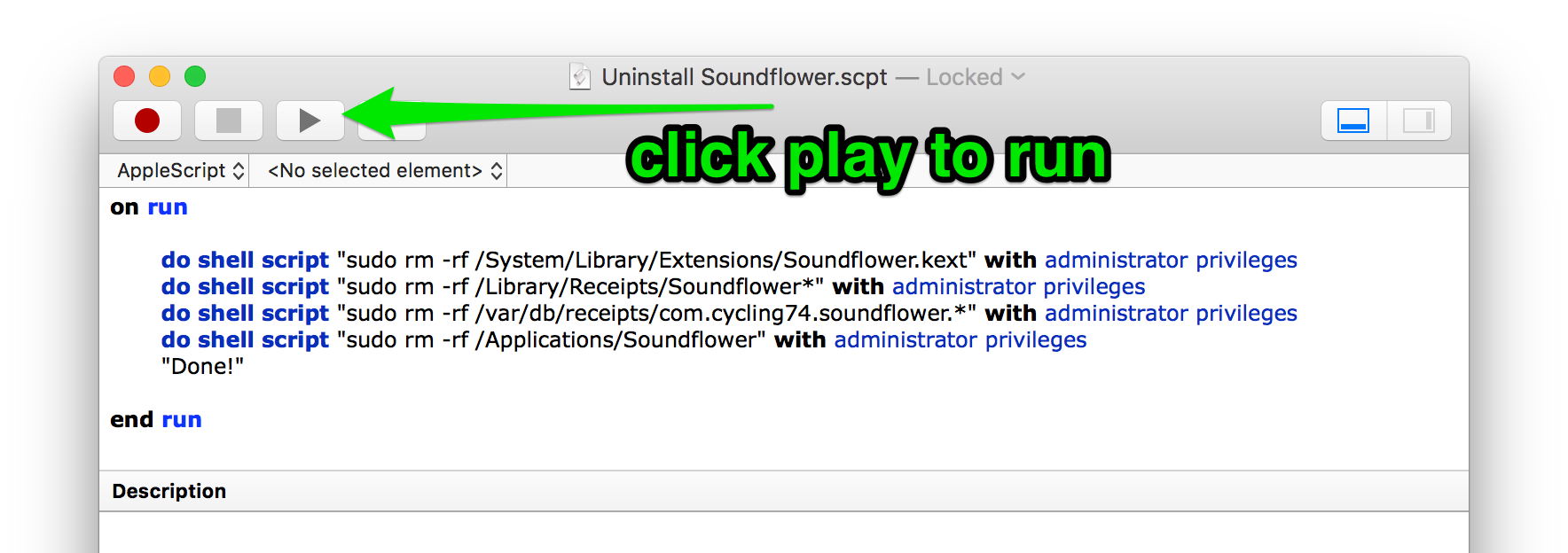
- Press the play button at the top of the window. Doing so executes the script and removes the existing driver.
- Reboot [seriously!] - This part is important! To ensure that the driver is unloaded correctly, you do need to reboot. Failing to do this part can result in update / installation / general weirdness (tm).
Driver Still There?
If when you reboot (you did reboot, right?) you find that Soundflower is still there, check that it isn't installed in another location as well (thanks for Hauke Norman for this tip).
- Is Soundflower.kext in /Library/Extensions?
- What about SoundflowerSigned.kext?
- Is it *anywhere at all*? From Terminal, type "mdfind -name Soundflower.kext"(without the quotes). If you get any files, these need to be removed for the driver to be uninstalled.
- or; "mdfind -name SoundflowerSigned.kext" (without the quotes)
- If so, delete it
- Reboot
Deleting the driver from a SIP protected folder
From 10.11 onwards, macOS protects certain folders. You may not be able to 'rm' the kext from terminal. Here's another idea from Keith, if you've a couple of macs:
- Start the offending machine in Target Disk Mode (https://www.google.co.nz/search?q=target+disk+mode&oq=Target+Disk+Mode)
- Access it from another machine, delete the offending kext.
System Integrity Protection
If you previously installed Soundflower on an older version of OS X you may encounter a message saying "The installer encountered an error that caused the installation to fail. Contact the software manufacturer for assistance." In this case you will need to disable System Integrity Protection and remove /System/Library/Extensions/Soundflower.kext (and then re-enable System Integrity Protection). If you don't know what this means, get a tech-savvy friend to do it for you.
Comments
17 comments
I followed the instructions and Soundflower is still an option for Airplay.
Did you also reboot?
I have followed the instructions, rebooted, and deleted the audio plist files in /Library/Preferences.
Sound flower files are nowhere to be found on my computer, but it still shows up in my Sound Preferences and Audio Midi Setup.
How do I get rid of these options in the drop down list?
Can you please send this to support@shinywhitebox.com and I can help you from there
Adam, do you have something like SplashTop Streamer installed? If I recall, it uses SoundFlower for audio over VNC.
Adam, if you find out what it was that caused the issue, let us know. It'd be useful to document this article with it.
How do you reboot i am just asking
Just to make this clear, when you double click on the Uninstall Soundflower script, a dialog box opens up. MAKE SURE you press the Play icon on the top of this window to run the script. I made the mistake of assuming that merely opening that window uninstalled Soundflower. It will ask for administrator's password, before running the uninstall. Worked like a charm for me!
Folks,
The above procedure did not work for me, I could still see Soundflower in System Preferences / Sound, Output tab.
Scanning my hard drive I've found that I've used a different installer, "Soundflower-2.0b2.dmg". I've found it on GitHub, link https://github.com/mattingalls/Soundflower/releases, under the subhead Downloads - "Soundflower-2.0b2.dmg". The Uninstall scrip is:
on run
do shell script "sudo rm -rf /System/Library/Extensions/Soundflower.kext" with administrator privileges
do shell script "sudo rm -rf /Library/Extensions/Soundflower.kext" with administrator privileges
do shell script "sudo rm -rf /Library/Receipts/Soundflower*" with administrator privileges
do shell script "sudo rm -rf /var/db/receipts/com.cycling74.soundflower.*" with administrator privileges
do shell script "sudo rm -rf /Applications/Soundflower" with administrator privileges
"Done!"
end run
You can see the extra line compared to the Uninstaller for Soundflower 1.6.6b:
do shell script "sudo rm -rf /Library/Extensions/Soundflower.kext" with administrator privileges
So *after* following Neil Clayton instructions above, if you're still seeing Sunflower in System Preferences / Sound, Output tab, try executing the above command on it own:
- Open Terminal app
- type in: sudo rm -rf /Library/Extensions/Soundflower.kext
- type your password when prompted.
Example session dump:
Last login: Sun Dec 4 10:07:59 on console
33-82-114-61:~ mihail$ sudo rm -rf /Library/Extensions/Soundflower.kext
Password:
33-82-114-61:~ mihail$
Cheers,
Mihail
Mihail's advies to Open Terminal app
- type in: sudo rm -rf /Library/Extensions/Soundflower.kext
- type your password when prompted.
FINALLY fixed this issue. At last. Many thanks indeed
Ditto. Mihail's solution was the only one that worked for me. I tried everything above that to no avail. Soundflower.kext was not appearing in my 'extensions' folder in Finder, though the "mdfind -name Soundflower.kext" command (shown above) showed it was there.
In High Sierra I can't remove it:
rob@Robs-MBP:/Users/rob> sudo rm -rf `mdfind -name Soundflower.kext`
Password:
rm: /Library/StagedExtensions/Library/Extensions/Soundflower.kext/Contents/_CodeSignature/CodeResources: Operation not permitted
rm: /Library/StagedExtensions/Library/Extensions/Soundflower.kext/Contents/_CodeSignature: Operation not permitted
rm: /Library/StagedExtensions/Library/Extensions/Soundflower.kext/Contents/MacOS/Soundflower: Operation not permitted
rm: /Library/StagedExtensions/Library/Extensions/Soundflower.kext/Contents/MacOS: Operation not permitted
rm: /Library/StagedExtensions/Library/Extensions/Soundflower.kext/Contents/Info.plist: Operation not permitted
rm: /Library/StagedExtensions/Library/Extensions/Soundflower.kext/Contents: Operation not permitted
rm: /Library/StagedExtensions/Library/Extensions/Soundflower.kext: Operation not permitted
rob@Robs-MBP:/Users/rob>
thanks a lot for your help ^_^ .. i'm so happy to see your site
Interesting!
Folks, search no more. Just follow the procedures above. It is not totally clear, as far as how you get to the hidden Library files, but it does the trick.
In Finder, just copy/paste the paths shown above and you will see clearly that the darn file is there.
From then on, just copy the scripts by Mihail Sestakov (all of them, to make sure), execute them and the magic is done.
This issue has haunted me for nearly 5 years now. Got fixed today. Thank you all
@Mihail Sestakov Scanning my hard drive I've found that I've used a different installer, "Soundflower-2.0b2.dmg". I've found it on GitHub, link https://github.com/mattingalls/Soundflower/website/releases, under the subhead Downloads - "Soundflower-2.0b2.dmg".
Thanks so much for this tutorial and code! It was really clear and helpful. I definitely wouldn't have been able to figure out how to uninstall Soundflower without this. I was literally "breaking my head" on this!
Thanks soooo much for this!
I did have a couple issues, but they were entirely self-inflicted. (It helps if you haven't deleted the Script Editor or the Audio Midi Setup!) So... after putting them back, poof! No more soundflower. Piece of cake!
I now use BlackHole for the same purpose, as it seems to have a better reputation. And I used the Midi Setup to create a dual output device, so I can listen while recording my screen--what a concept.
Woohoo, and THANKS AGAIN!
Please sign in to leave a comment.